easyFS ADD-ON
easyFS AI Hub
Three AI tools inside your easyFS accounting system: turn documents into drafts, ask questions about your data in plain words, and bring in data from another system with every row checked.
AI Hub is an add-on to easyFS. It requires an easyFS subscription. You stay in control: the AI prepares and checks, and nothing is posted or imported until you confirm.
THREE PRODUCTS
Less manual encoding. Clearer answers. Faster data migration.
Choose the AI Hub products that fit your business. Each one works inside easyFS and keeps you in the loop before anything changes in your books.
Smart Capture
Photos, scans and files of your documents become drafts you check before posting, so less time goes into typing them in.
AI Assistant
Ask for reports in plain words, refine them in follow-up questions, and export the result to Excel, PDF or CSV.
Data Uploader
Bring in data exported from another accounting system. The AI maps the columns and every row is checked before import.
FEATURES
What each tool does
Smart Capture
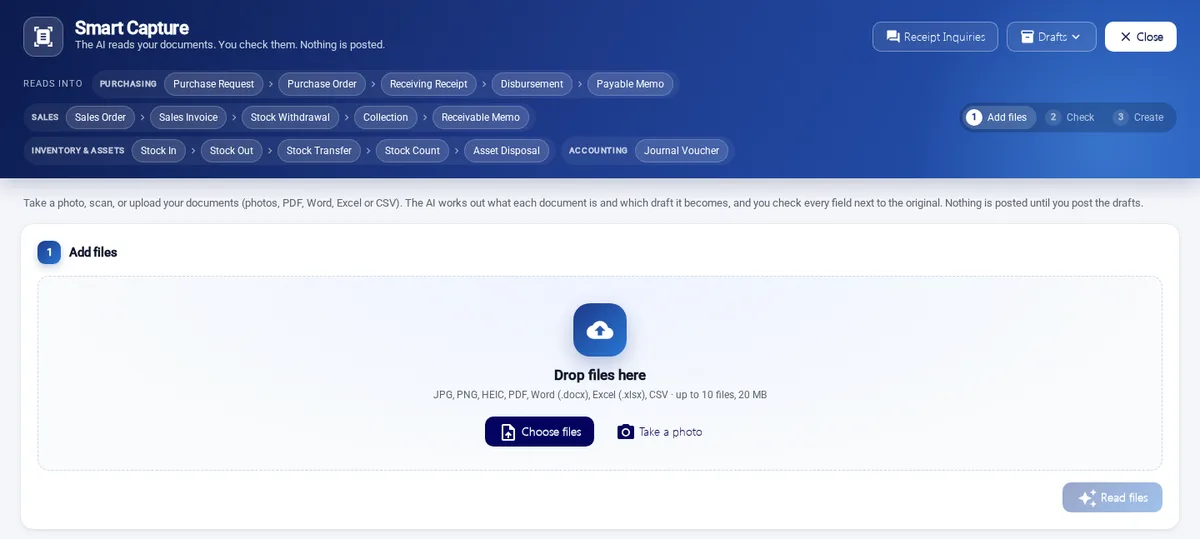
Take a photo, scan, or upload your documents. The AI works out what each document is and which draft it becomes. You check every field next to the original, and nothing is posted until you post the drafts.
- Photos and files: JPG, PNG, HEIC, PDF, Word, Excel and CSV.
- Reads into purchasing, sales, inventory and accounting drafts.
- Original and extracted fields shown side by side for your review.
Purchase RequestPurchase OrderReceiving ReceiptDisbursementPayable MemoSales OrderSales InvoiceStock WithdrawalCollectionReceivable MemoStock InStock OutStock TransferStock CountAsset DisposalJournal Voucher
AI Assistant
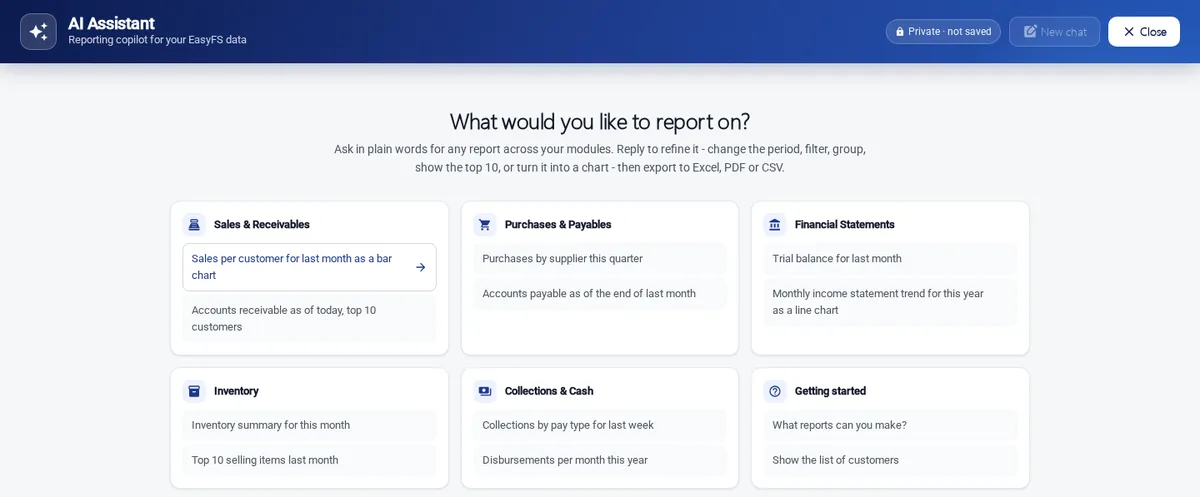
A reporting copilot for your easyFS data. Ask in plain words, then reply to refine the report: change the period, filter, group, show the top 10, or turn it into a chart.
- Reports across sales and receivables, purchases and payables, inventory, collections and cash, and financial statements.
- Export to Excel, PDF or CSV.
- Private: conversations are not saved.
Data Uploader
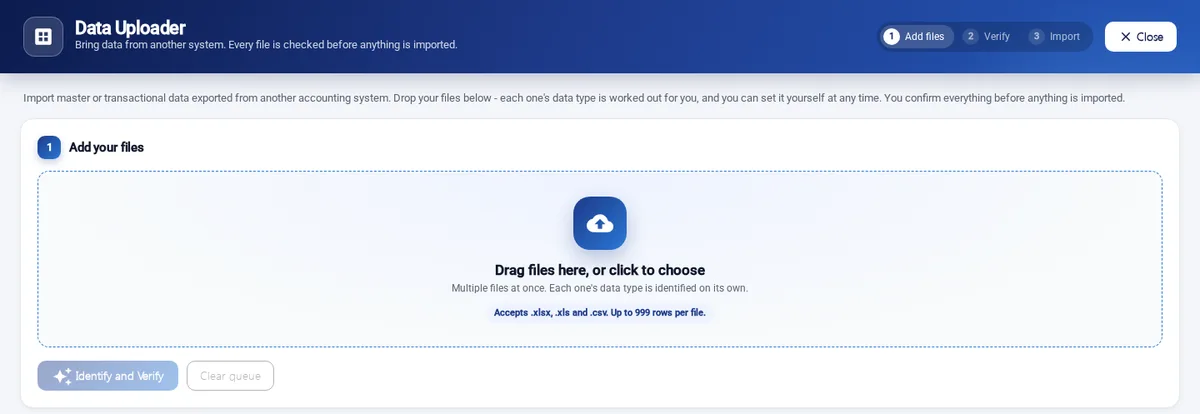
Bring in master or transactional data exported from another accounting system. Drop your files in, and each file’s data type is worked out for you. You confirm everything before anything is imported.
- Accepts .xlsx, .xls and .csv files, up to 999 rows per file.
- The AI maps the file’s columns; every row is checked.
- Three steps: add files, verify, import.
PRICING
AI Hub plans and pricing
Prices are in Philippine pesos (PHP). Each price is shown as a monthly equivalent for easy comparison, with the full annual amount that is paid in advance.
AI Hub requires an easyFS subscription. Base easyFS fees, applicable one-time setup/migration fees, usage overages and taxes are separate, unless expressly included in the official quotation.
Smart Capture
Smart Capture Starter
PHP 1,500 / month equivalent
Monthly equivalent — billed annually in advance
PHP 18,000 per year
Annual advance payment
200 documents / month
Smart Capture Business
PHP 4,500 / month equivalent
Monthly equivalent — billed annually in advance
PHP 54,000 per year
Annual advance payment
1,000 documents / month
Smart Capture Scale
PHP 12,000 / month equivalent
Monthly equivalent — billed annually in advance
PHP 144,000 per year
Annual advance payment
3,500 documents / month
- Additional documents: PHP 6 per additional document
- One-time setup: PHP 15,000 – 30,000 per customer, based on scope (sheet configuration, folders, mapping)
A document is one submitted scan, photo or PDF. How documents are counted is set out in your official quotation.
AI Assistant
Included with any paid AI Hub product: 100 AI Assistant questions per month at no additional fee. Need more? AI Assistant Plus adds a higher monthly question allowance.
AI Assistant Plus
PHP 2,500 / month equivalent
Monthly equivalent — billed annually in advance
PHP 30,000 per year
Annual advance payment
1,500 questions / month
Data Uploader
Data Uploader Starter
PHP 1,500 / month equivalent
Monthly equivalent — billed annually in advance
PHP 18,000 per year
Annual advance payment
5,000 rows / month
Data Uploader Business
PHP 4,000 / month equivalent
Monthly equivalent — billed annually in advance
PHP 48,000 per year
Annual advance payment
25,000 rows / month
Data Uploader Scale
PHP 10,000 / month equivalent
Monthly equivalent — billed annually in advance
PHP 120,000 per year
Annual advance payment
100,000 rows / month
- Additional rows: PHP 0.20 per additional row
- One-time migration pack: PHP 10,000 for up to 50,000 rows
Data Uploader accepts up to 999 rows per file; larger migrations are loaded in several files. The monthly row allowance applies across all the files you upload in the month.
Subscriptions are billed annually in advance. Final prices, one-time fees and terms are confirmed in your official quotation.
BUNDLE SAVINGS
Use more than one? Save on the combined subscription.
Any two paid AI Hub products
15% off the combined subscription price.
All three paid AI Hub products
20% off the combined subscription price.
Example: all three products
| Smart Capture Business | PHP 4,500 |
| AI Assistant Plus | PHP 2,500 |
| Data Uploader Starter | PHP 1,500 |
| Monthly equivalent before discount | PHP 8,500 |
|---|---|
| Monthly equivalent after 20% bundle discount | PHP 6,800 |
| Annual advance payment | PHP 81,600 |
Without the bundle discount the same three products are PHP 102,000 per year. Monthly equivalent — billed annually in advance. One-time setup/migration fees, usage overages, taxes and base easyFS fees are separate unless expressly included in the official quotation. This is an illustrative example; your bundle is confirmed in your official quotation.
HOW IT WORKS
From request to results
- Request a demo or quotationTell us which AI Hub products you are interested in. We confirm the plan, any one-time setup or migration, and the official quotation.
- We switch AI Hub on for your companyAI Hub options are enabled per easyFS company. Once on, you open Smart Capture, AI Assistant and Data Uploader from the AI Hub menu in easyFS.
- Review, then post or importThe AI prepares drafts, answers and mapped data. You check the results before anything is posted or imported.
FAQ
Frequently asked questions
What is easyFS AI Hub?
easyFS AI Hub is an add-on to your easyFS subscription. It brings three AI tools into the system you already use for accounting: Smart Capture, AI Assistant and Data Uploader. You open them from the AI Hub menu inside easyFS.
Do I need easyFS to use AI Hub?
Yes. AI Hub requires an easyFS subscription. Base easyFS fees, applicable one-time setup/migration fees, usage overages and taxes are separate, unless expressly included in the official quotation.
How is AI Hub billed?
AI Hub subscriptions are billed annually in advance. Prices are shown as a monthly equivalent so that plans are easy to compare, together with the full annual amount you pay in advance. AI Hub is not offered with monthly payment.
Does the AI post transactions for me?
No. Smart Capture turns your documents into drafts, and you check every field next to the original before you post anything. With Data Uploader, every file is checked and you confirm before anything is imported. AI Assistant reports on your data and does not change it.
What can Smart Capture read?
You can take a photo, scan, or upload JPG, PNG, HEIC, PDF, Word, Excel or CSV files. The AI works out what each document is and which draft it becomes, across purchasing, sales, inventory and accounting documents such as purchase orders, sales invoices, collections, stock documents and journal vouchers.
What files does Data Uploader accept?
Data Uploader accepts .xlsx, .xls and .csv files, up to 999 rows per file. Each file’s data type is identified for you, and you can set it yourself at any time.
Are the AI results always correct?
AI can misread a document or map a column incorrectly, which is why every AI Hub tool shows you the result for checking before anything is posted or imported. Please review each result.
How is my information handled?
AI Hub uses AI services to read the documents and questions you submit and to produce results. AI Assistant conversations are not saved ("Private · not saved" is shown on the screen). Contact us if you need more detail for your own data-privacy review.
Where do I find the contract terms?
Your subscription terms are set out in your official quotation. To get one, request a quotation below and our team will contact you.
GET STARTED
Request a Demo or Quotation
Tell us in the message that you are interested in easyFS AI Hub, and which products (Smart Capture, AI Assistant, Data Uploader). Our team will get back to you.
